

Administration
Open Settings from the avatar menu. Press / inside Settings to search any control by name.
- Preferences: per-account Appearance plus per-browser Layout, Preview renderer, Save exports automatically, and Install app.
- Account: active profile, Signed-in devices (revoke individual or all other sessions), and Export presets.
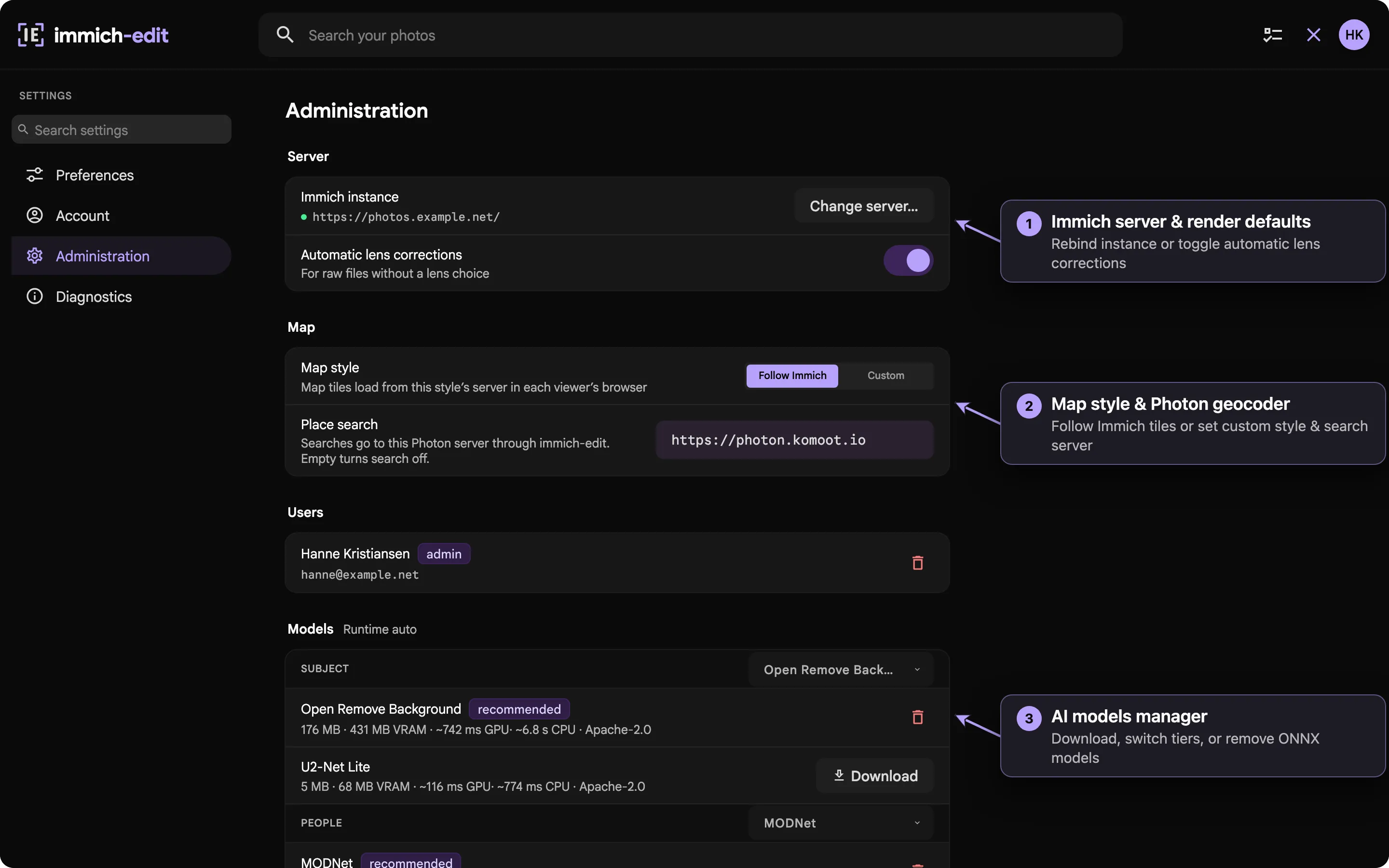
- Administration (Immich admins only): Server, Map, Users, and Models.
- Diagnostics: live server, GPU, browser renderer, codec, latency, cache, and redacted config status, with Copy support bundle for bug reports.
Users and security
Section titled “Users and security”Users sign in with Immich (OAuth, password, or API key). Local edits, history, presets, jobs, and exports are isolated per user; ratings, favorites, tags, and rejects sync through Immich.
- Under Administration > Users, disable access (revokes sessions, keeps data) or purge a user’s local data (requires confirming their email).
- Session cookies are
HttpOnlyandSameSite=Strict; stored Immich credentials are encrypted withDATA_DIR/instance.key.
Editing defaults and shared assets
Section titled “Editing defaults and shared assets”- Automatic lens corrections (Administration > Server): instance-wide default (on by default) for RAW files without an explicit per-photo choice.
- Shared imports (admin-only, managed where used):
.cubeLUTs in Develop > LUT,.dcpprofiles in Develop > Camera Profile, and PNG watermarks in Export > Watermark.
Under Administration > Map (no API keys required):
- Map style: follow Immich’s map style by default, or supply custom MapLibre light/dark style URLs. Browsers load tiles directly from the configured tile server.
- Place search: Photon server URL (default
https://photon.komoot.io), proxied by immich-edit so clients’ IPs stay private. Clear the field to disable search.
AI models
Section titled “AI models”Install optional models for AI masks, AI Denoise, and Lens Blur (depth) under
Administration > Models. Downloads verify a pinned SHA-256 digest and store under
DATA_DIR/models. AI Denoise needs ~1 GB RAM per 24 MP photo while running. Control runtime
with ML_RUNTIME (auto, gpu, cpu, off).
Rebind Immich instance
Section titled “Rebind Immich instance”Administration > Server > Immich instance > Change server… rebinds immich-edit to a new Immich URL (works even while the old Immich server is unreachable).